
Pro tip: Use ⌘K to quickly search anything in Kazi
Chat, calls and inbox in one place
Every conversation,finally in one place
Conversations get lost across email, Slack and WhatsApp, and the context vanishes with them. KAZI brings real-time team and client chat, one-click voice and video calls, a unified inbox, and an AI email assistant into the same workspace where the work happens, so nothing slips and nobody has to ask "where did we talk about this?"
Real-time chatOne-click callsGuests can join
kazii.ai/dashboard/messages
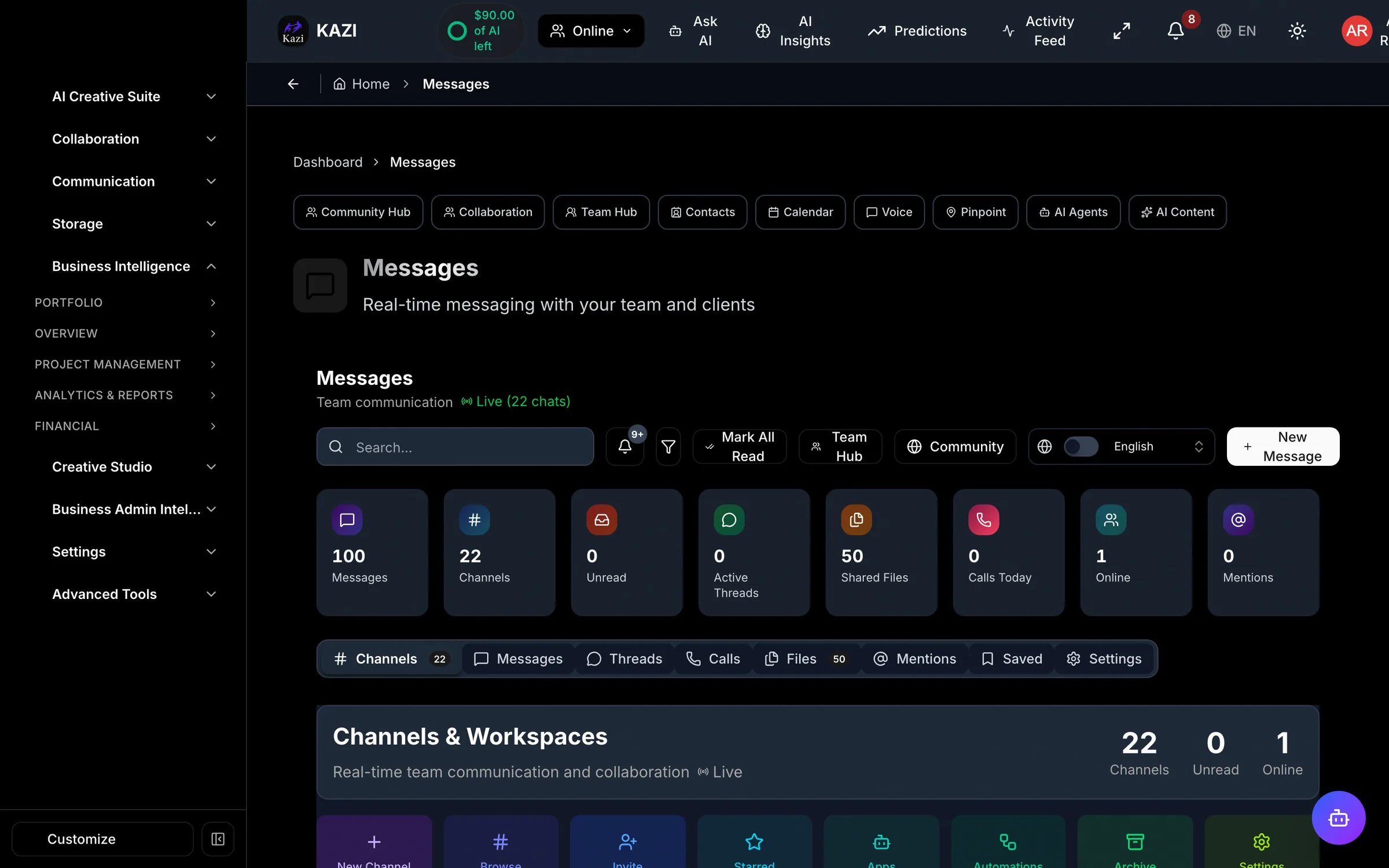
DMs, channels and threads with reactions, mentions and read receipts.
Stop paying the tab-switching tax
Jumping between email, chat apps and video tools burns time and buries details. When your conversations live where your work lives, everyone stays on the same page, and you get hours of your week back.
One thread per topic
Chat, files and decisions stay attached to the project or client they belong to. No more scrolling three apps to reconstruct a conversation.
Talk face to face fast
A one-click call with screen share turns a confusing thread into a two-minute conversation, guests included.
Never miss the important one
Push and email notifications surface the messages that need you, so a client is never left waiting.
Everything you need to stay in touch
Real-time chat, calls, a unified inbox and an AI email assistant, all connected to your work. Follow any card to its full feature page.
Talk in real time
Chat and call your team and your clients without switching apps, so every message and every call sits next to the work it is about.
Flagship
Team & Client Chat
Direct messages, channels and threads with reactions, mentions, typing indicators and read receipts, so you always know a message landed and who is on it.
ExploreOne clickVoice & Video Calls
Start a voice or video call in one click, right where you work, with screen share built in. Perfect for a quick client walkthrough or a team huddle.
ExploreChannels & Threads
Organize conversations by project, client or topic so the right people see the right thread, and nothing important gets buried in a group chat.
ExploreNothing slips through the cracks
Pull every conversation into one place, let AI take the first pass at your replies, and get a nudge the moment something needs you.
Unified Inbox
One inbox for your messages and conversations, so you stop hopping between tabs and tools to find that one thread you half-remember.
ExploreAIAI Email Assistant
Let AI draft a clear, on-tone reply for you to review and send, turning a full inbox into a five-minute job instead of an afternoon.
ExploreNotifications
Push and email notifications keep you in the loop on new messages and calls, dialed in so you hear about what matters, not everything.
ExploreConversations woven into your work
KAZI does not bolt a chat window onto the side. Communication lives inside the modules you already use, so every message and call carries its full context.
Client Portal
Clients message you right inside their portal. No new login, no lost email thread, everything tied to their project.
Projects
Every conversation is attached to the work it is about, so context is one click away instead of buried in your inbox.
Voice Rooms
Jump from a chat thread into a live voice or video room, screen share included, without scheduling a thing.
Inbox
Messages from every channel land in one unified inbox, so your whole day of conversations lives on a single screen.
Email
The AI email assistant drafts replies for you to approve, keeping your client email fast and consistently on-brand.
Alerts
Push and email notifications reach you wherever you are, so a client message never sits unseen for hours.
Easy for everyone, private by default
Guests join in a click, your conversations stay yours, and everything updates in real time.
Guests can join
Invite a client or collaborator into a call or conversation without making them sign up for an account first.
Your conversations stay private
Messages and calls are visible only to the people in them. Your conversations are never sold or used to train third-party AI models.
Find any message
Search your conversations by keyword to jump straight back to that decision, file or detail you need.
Real-time, everywhere
Chat, calls and notifications update live across your devices, so your team and clients are always on the same page.
Communication questions, answered
Straight answers about chat, calls, the inbox, email and notifications.
Can I message both my team and my clients in KAZI?
Yes. KAZI gives you real-time chat for both: direct messages, channels and threads with reactions, mentions, typing indicators and read receipts. Clients can also message you inside their own client portal, so every conversation stays tied to the project it belongs to instead of scattering across email and WhatsApp.
Does KAZI have voice and video calls?
Yes. You can start a one-click voice or video call right where you work, with screen sharing built in. It is ideal for a quick client walkthrough or a team huddle without scheduling a separate meeting in another app.
Can clients or guests join a call without an account?
Yes. You can invite a client or collaborator to join a call or conversation as a guest, without requiring them to create an account first. That keeps it easy for the people you work with to jump in.
What is the unified inbox?
The unified inbox brings your messages and conversations together in one place, so you stop hopping between tabs and tools to track down a thread. Everything you need to reply to lives on a single screen.
How does the AI email assistant work?
The AI email assistant drafts a clear, on-tone reply for you to review and send. You stay in control (nothing goes out without your approval), but a full inbox becomes a quick review instead of hours of writing from scratch.
Can I search my messages?
Yes. You can search your conversations by keyword to jump straight to the message, decision or file you are looking for, so nothing important gets lost in a long thread.
Will I be notified of new messages and calls?
Yes. KAZI sends push and email notifications for new messages and calls, tuned so you hear about what matters rather than being buried in alerts. A client message never sits unseen for hours.
Does this replace Slack, email and WhatsApp?
For most freelancers and small teams, yes. KAZI combines real-time team and client chat, voice and video calls, a unified inbox and an AI email assistant in one place, and it is connected to your projects and clients, so conversations always carry their context instead of living in a separate silo.
Bring every conversation into one place
Real-time chat, one-click calls, a unified inbox and an AI email assistant, right where you do the work, with your team and your clients.